“It’s OK. We’ll still get Texas and Kansas.”
“Sir…”
Trump Downfall parodies are a gift for the ages. As many accolades as the movie has earned, this may be its greatest legacy.

Fast, private email hosting for you or your business. Try Fastmail free for up to 30 days.
“It’s OK. We’ll still get Texas and Kansas.”
“Sir…”
Trump Downfall parodies are a gift for the ages. As many accolades as the movie has earned, this may be its greatest legacy.
Hafiz Rashid, The New Republic:
With Democratic victories in state legislatures and governorships across the country Tuesday, the Electoral College could now be in jeopardy—even without a near-impossible constitutional amendment.
If passed by enough states, the National Popular Vote Interstate Compact would effectively nullify the Electoral College and, with it, the possibility of a candidate being elected president without winning the popular vote. Since the compact was introduced in 2006, 19 states have passed it, agreeing to assign their electoral votes to whichever candidate wins the national popular vote. That amounts to 222 of the 270 electoral votes that a candidate needs to win the presidential election.
On Tuesday, Democrats took control of state legislatures and governorships in Pennsylvania, Michigan, Arizona, Wisconsin, and Nevada, all states that haven’t agreed to the compact. If all five vote to join, then the total number of electoral votes apportioned based on the national popular vote jumps to 283.
When I first started paying attention to the National Popular Vote Compact in 2016, it had accumulated 165 electoral votes. By 2024 it had progressed to 209. There are dozens of higher priorities Democrats must focus on, but if they can leverage their legislative trifectas to trigger the compact, it could be the most consequential and durable outcome of this year’s blue tsunami.
Jonny Evans at Computerworld interviewed Tom Boger, Apple’s VP of Mac and iPad Product Marketing, about the MacBook Pro with PROLED XDR Display. Evans didn’t ask about that mouthful of a name, but Boger did share a small nugget about the return of the glowing Apple logo:
The magic this time, he said, is that the logo is also reflective, with the mirror-like finish intact. What that means is that when you close the Mac, the logo appears as a shiny mirror black logo. He would not explain how. “That’s something we’re going to let be the mystery and the magic of this implementation,” he told me. Pressed a second time, he said only that Apple has fantastic engineers and “it’s just magic.”
He framed it as a gesture to the customer. “People’s lives are on their Mac,” he said, and they take great pride in it. Bringing the glowing logo back is one way to honor that relationship. Apple wanted to revive in “a much more elevated way.”
I love that the logo remains reflective when not illuminated. If not for the touchscreen, the glowing logo would be the only thing everyone talked about.
Ernie Suggs, writing in The Atlanta Journal-Constitution (paywalled; Apple News+ link):
In 1860, an enslaved man named Sheppard Peek was listed among the possessions of William Peek, a white man in Crawfordville.
His value was placed at $1,400.
On another surviving document, Sheppard signed his name with an X.
More than a century and a half later, Sheppard’s great-great-granddaughter, Keisha Lance Bottoms, was elected governor of Georgia.
Bottoms is the first Black woman to be elected governor in America’s 250-year history. Following this week’s elections, she becomes one of only seven Black Americans elected governor, joining L. Douglas Wilder (Virginia, 1989), Deval Patrick (Massachusetts, 2006), and Wes Moore (Maryland, 2022), plus three elected alongside Bottoms this year: Byron Donalds (Florida), Aaron Ford (Nevada), and David Crowley (Wisconsin).
(Remarkably, the United States has never seen more than one Black governor serve at a time. Following this election, there will be five simultaneous Black governors.)
It’s not unusual for headlines to shift over time, but this change for an opinion piece from The New York Times Editorial Board on the outcome of Tuesday’s elections went from incisive to anodyne in a few hours.
The original, as seen early Wednesday morning: “The American People Have Repudiated Trump.” Sharp, active, decisive. Who did what to whom.
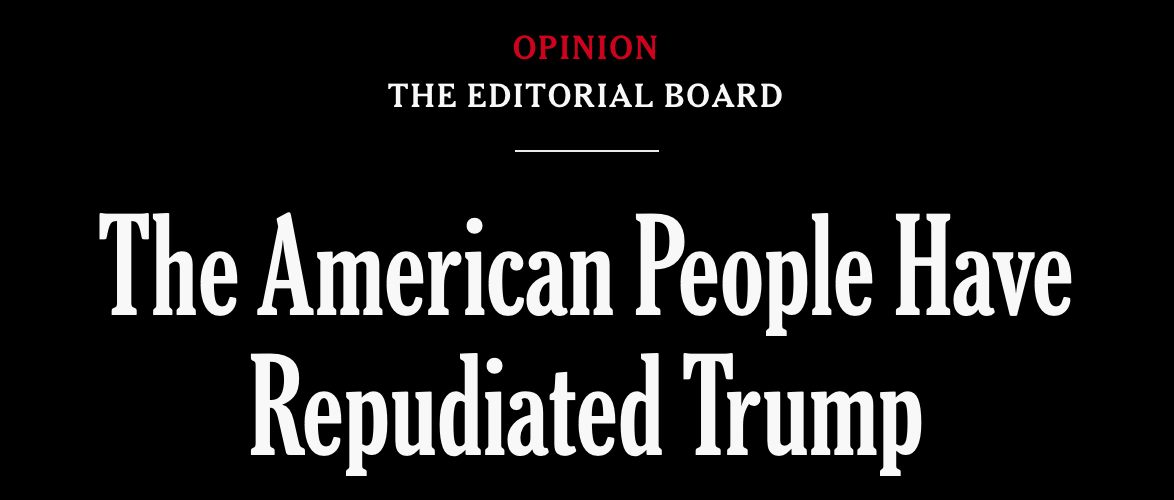
A few hours later, it was changed to “Trump Has Met His Match.” Dull, subdued, lifeless. Completely drained of its vitality. No one did anything to Trump; it just happened. Hello, match.

The editorial itself is unafraid to use the word:
The repudiation was broad enough to overcome America’s political polarization. Republicans lost races even in traditionally deep red places, including Kansas, Kentucky, Iowa, Ohio, South Carolina and Texas. They lost because many independents and even Republicans consider Mr. Trump’s second term to be a failure.
Why neuter the headline? It’s an opinion piece. Express an opinion.
Stunning photos of a stunning night, from New York Times photographers.
I don’t usually stay awake to watch midterm election returns, but last night I watched more than seven hours of KornackiCam while my friends and I exchanged jubilant text messages as the sheer breadth of the election night wave became clear.
Lisa Lerer, writing for The New York Times:
In the end, it wasn’t just a wave. It was a wipeout.
A Democrat won a Senate seat in Kansas for the first time since the Herbert Hoover administration. The party picked up Senate seats in Texas, North Carolina and South Carolina. Republicans even fell short in House districts in the South where they had tried to give themselves an edge by drawing new, gerrymandered maps.
The sweeping Democratic victories on Tuesday night offered a decisive rebuke to President Trump and his aggressive, often chaotic second-term agenda.
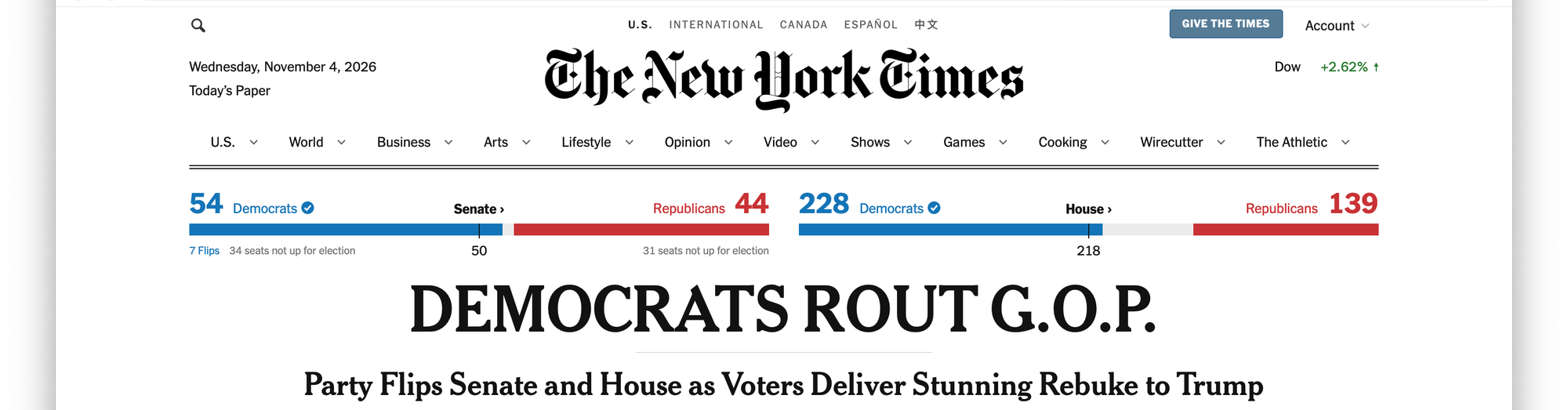
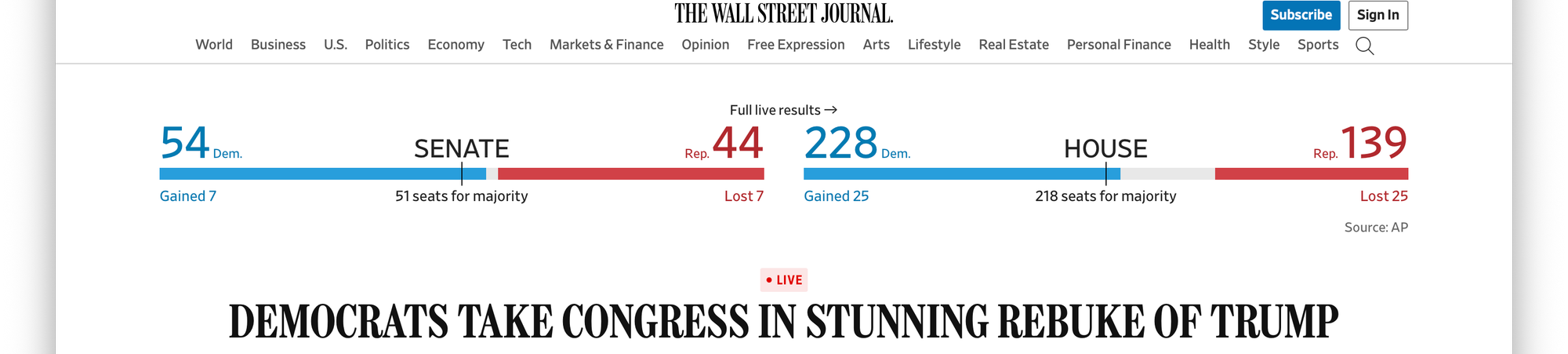
Both The New York Times and The Wall Street Journal described Tuesday’s election results as a “stunning rebuke” of Donald Trump. (Also: a drubbing, a landslide, an earthquake, a wipeout, and a rout.)
Stunning Rebuke
Democrats seized decisive control of Congress, flipping seven Senate seats for a total of 54 (and may yet gain a 55th and 56th), while the House of Representatives will see at least 236 Democrats and possibly as many as 258.
Democrats also flipped five governors’ seats, securing control of a majority of governorships—including, for the first time in U.S. history, simultaneous Black governors. Five of them, in fact. (One is a bright-red MAGA from Florida, but still.)
Those governorships also include Gina Hinojosa, who will become the first Latina governor in Texas state history, and Xavier Becerra, the first Latino governor of California in 150 years.
In America’s 250th year, there were several firsts. Terry Tang, AP News:
There were cheers and happy tears at election parties from New Mexico to Georgia late Tuesday once it became clear voters had elected the country’s first Black female governor, the first Native American female governor, the first Native female senator and the first openly gay male U.S. senator. By early Wednesday, the first Muslim U.S. senator was also added to the list of barrier-breaking milestones. The astonishing blue wave also means the United States will likely have its first-ever Black speaker of the House.
This is America finally voting for leaders more reflective of the diversity in our country. It’s a welcome change.
This election is a clear repudiation of Trump and his divisive politics, but having seen the fever break briefly before, I remain cautious. In truth, the patient is still sick. The prognosis has improved significantly in the last day, though. Perhaps we are finally on a path to healing.
⚙︎whynoai.info is a single-serving website from Dave Rahardja itemizing fifteen reasons (so far) to stand against AI, complete with supporting links. From “It’s theft” to “It enriches bad people” to “It’s generic slop,” there’s nothing on this list I disagree with—yet I still find myself using, and even enjoying, AI. I find it to be a valuable tool in several contexts, from proofreading to information retrieval to programming. I don’t much like the way we got here or who is profiting, and I fully expect the bubble will burst sooner than later. And I’m not out here sharing “reasons to use AI.” But the technology itself is fascinating and will, I believe, in the long run prove beneficial to society. Some may call this naïveté or hypocrisy; I prefer to call it critical appreciation.
Andrew E. Freedman, Tom’s Hardware:
OpenAI CEO Sam Altman has data centers full of memory, but seemingly it’s the 32GB of RAM in your desktop that’s the problem. In an interview over beers with the YouTube channel Cheeky Pint, Altman said that local inference, and, by extension, people having DRAM in computers at home, is “quite terrible.”
When discussing local inference on home computers with open-source models, Altman discussed the assumption that people will be able to run local AI on their own computers, the ones they may already own or want to build. Then he explained why that’s a bad idea (at the 29-minute mark):
“From a global allocation perspective, actually, it’s quite terrible to have everybody have a bunch of the world’s limited supply of DRAM sitting in their own computer and being used 5% of the time,” Altman said. “You want maximum utilization in the cloud if you’re trying to deal with this very supply-constrained environment. And somehow many people’s intuition is the opposite of that.”
Of course a CEO who rents access to cloud-based LLMs is going to crap on local LLMs. Imagine the McDonald’s CEO saying “it’s quite terrible to have everyone have a kitchen being used 5% of the time.” It’s quite obviously an idiotic take, and Altman is being roundly mocked for it by every halfwit with a social media presence.
Oliver Haslam, Tom’s Hardware:
Elon Musk mocks OpenAI CEO Sam Altman’s claim that PCs having RAM is terrible — ‘The people deserve to have their RAM too!’ […]
Mocking the point, Musk shared a meme on X that referenced a movie in which a German WWII officer appears to be hunting for people hiding sticks of DRAM.
(The movie is Inglourious Basterds. It’s a widely used meme. I’m not sure why Haslam doesn’t name it.)
I hate myself for saying this (and leaving aside how that scene proceeds), but it’s a genuinely funny rejoinder from Musk, whom I’ve always found to be exceptionally mirthless.
I can’t believe I’m agreeing with the least liked man in America as he dunks on the least cool man in America.
I feel sick.
Apple today announced financial results for its fiscal 2026 fourth quarter ended September 26, 2026. The Company posted quarterly revenue of $114.5 billion, up 12 percent year over year. Company gross margin was 47.9 percent, including a favorable impact of approximately 1 percentage point from tariff refunds. Diluted earnings per share was $2.10, up 14 percent year over year, and included a favorable impact of $0.05 from tariff refunds.
This was John Ternus’ first earnings call as CEO, and, as is tradition, he spent the first half of his introductory remarks reflecting on Apple’s recent releases (on iPhone Duo: “the most transformational iPhone since the original”; on Siri AI: “[it’s] the Siri we’ve always wanted”; on Mac: “[it’s] what brought me to Apple”; and, of course, on Apple: “Apple is the greatest company in the world”). He then turned to Apple’s “excellent quarter.” And it was, indeed.
Apple’s year-over-year revenue growth was 17% for iPhone, 24% for Mac (despite both suffering from “supply constraints”), and 10% for Services. Apple “generated $28 billion in operating cash flow” and returned 100% of that to shareholders via stock buybacks and dividends.
It’s quite the quarterly capper on Apple’s “best fiscal year yet”: $478.8 billion in annual revenue, up 15% from 2025, with a record earnings per share (EPS) of $8.98 (up 20% over last year).
Despite Ternus’ revelation that “we have never sold more Macs in a fiscal year than we did this time” and that iPhone “set a September quarter record for upgraders,” it remains unclear how much of that record revenue is because Apple sold more stuff or sold that stuff for more money. Regardless, Apple generated more revenue than ever. Naturally, after such a strong quarter and year, Apple’s stock is down 1.83% for the day and an additional 2.8% after hours.
One other striking number worth calling out:
Operating expenses came in at $19.2 billion, up 21% year-over-year, as we continue to make investments in R&D.
Those R&D investments represent about eighteen points of the 21% increase in operating expenses, or about $11.7 billion of the $19.2 billion. R&D grew around 32% in both this past quarter and for the year—up $11.2 billion annually, for a total of $45.765 billion in FY26.
I’m confident a significant portion of this R&D increase is attributable to AI (CFO Kevan Parekh implies as much when answering a question about increased operating expenses for the coming December quarter), but whatever it’s for, Apple is significantly outspent in R&D by Meta and Alphabet (Google): in Q3 2026 alone, each spent nearly half of what Apple did for all of FY26—and each has already surpassed Apple’s annual R&D expenses in just their first three reported quarters.
I understand Apple, Meta, and Alphabet are in very different businesses and have very different research and development needs and reporting methodologies, but I find the difference stark.
| R&D Expenses | Quarter* ($B) | YTD* ($B) |
|---|---|---|
| Apple | $11.7 | $45.8 |
| Meta | $20.1 | $59.41 |
| Alphabet | $20.6 | $55.89 |
* Quarter: Q4 for Apple; Q3 for Meta and Alphabet. YTD: Full year for Apple; nine months for Meta and Alphabet.
Despite its comparatively small R&D budget, Apple still manages to build a remarkably impressive and influential product lineup that generates an astounding amount of money every year. I’m left to wonder: what level of product excellence and innovation could Apple unleash if it were to match the R&D budgets of its tech peers?
Perhaps, with a product guy once again at the helm, we’ll soon find out.
See Also: Jason Snell’s transcript and traditional barrage of charts and graphs.
Apple’s FY 2026 fourth quarter results come out today following the closing bell, and soon after that, John Ternus will lead his first earnings call as CEO. It will, of course, be thoroughly scripted, so I’m not expecting any great surprises. I’m mostly curious if Tim Cook will make an appearance and if Ternus will at some point say “Hi, this is John.”
You can listen to the call live starting at 2pm PT / 5pm ET or to a replay afterward. It’s also available as a podcast (Apple Podcasts, Overcast). Hopefully someone at Apple remembers to update the “Hosts & Guests,” or things will get awkward.
Update: Ternus did not say “This is John,” but we did get “This is Sabih” from COO Sabih Khan. And someone at Apple did remember to update the podcast page, less than an hour after I posted. They also fixed the order, placing Ternus first after initially having him second. I’m assuming that I have the power.

Marisa Kabas at The Handbasket scores an interview with Tom Hoyle, the South Carolinian who last week went viral for his “Jonestown Massacre” MAGA comparison on Fox “News.” First, Kabas describes the (hilariously brief) interview:
In it, the reporter asks him “Why are you here this morning?” Hoyle, with a bushy beard and wearing a baseball cap and a shirt with the logo for the band Death, replied “Well, in the late ‘70s, I was a little too young to get involved and go to South America for the Jonestown Massacre. But this is as close as I’ll ever get, so that’s why I’m here.” Confused, the reporter says “Wait, the Jonestown Massacre?” Hoyle fires back, “That’s right. There’s nothing like seeing a cult right up front.”
(Do watch the clip; Hoyle’s timing is impeccable. He says he learned it from Billy Crystal.)
KABAS: So this is just your nature.
HOYLE: It is very much. I’m 57 and a half years old, and I grew up two miles from our office. And people will tell you I’ve always been a loud mouth, and I’m such an anti-bully. I become a bully with bullies. So maybe Gandhi wouldn’t approve, but, you know, maybe Malcolm X would.
“By any means necessary.”
Later:
KABAS: So what do you think made that Fox News reporter want to talk to you?
HOYLE: I think because there’s a certain stereotype of white guys with some sort of facial hair and a ball cap on, and I fell into that. They don’t understand that I’m what you call a daywalker. I look like you, but I’m not like you. I’m the vampire during the day—come talk to me and watch yourself get bitten. They thought I looked like that, and other white people have done that over the decades. They’ll think I’m one way and say something, and then I remind them where I grew up two miles from here in a mostly Black neighborhood. It doesn’t matter where I grew up, but I’ve got a special, let’s just say, perspective on things that makes me a little hypersensitive to it.
Judge not by the color of his skin (nor by his beard nor hat), but by the content of his character. Tom from South Carolina is the hero we both need and deserve.
I would be remiss if I didn’t point out that the Fox “News” reporter’s immediate reaction was to quickly end the interview (“maybe this is not a Trump supporter…”) and then literally pivot in hopes of finding someone who was. Fox “News” is a MAGA propaganda outlet.
Apple published “PROLED XDR Display Technology Overview” (PDF), for anyone curious about the features and capabilities of the new MacBook Pro ProLED XDR displays. Plenty of (marketing-oriented) details about the display technology (though none about the touchscreen).
During a recent visit to Seattle, we visited Chihuly Garden and Glass, a long-term exhibition of the works of glass sculptor Dale Chihuly. The exhibition, which opened in 2012 at the Seattle Center at the base of the Space Needle, is a vibrant, colorful collection of dozens of stunning blown-glass pieces, ranging from small, organic baskets to massive, intricate installations. The main link is to a six-minute video overview of the exhibition. You can also watch Playing with Fire, one of the short films shown in the exhibition’s theater. Or visit the Chihuly Garden and Glass site to learn more about the artist and the exhibition. As I wandered through, the pieces felt oddly familiar. It turns out I’d seen Chihuly’s work before: one of his installations, “Fiori di Como,” graces the ceiling of the Bellagio in Las Vegas.
Aaron Couch, The Hollywood Reporter:
Patrick Stewart, the sophisticated actor who brought a Shakespearean touch to Star Trek and X-Men as he made an otherworldly transformation from British stage veteran to sci-fi icon, has died. He was 86.
Stewart died Wednesday at his home in Los Angeles following “a brief and poignant journey with Alzheimer’s disease and Lewy body dementia,” longtime spokesperson Kelly Bush Novak announced.
This anecdote from THR made me chuckle:
The Los Angeles Times referred to him as an “unknown British Shakespearean actor” in a story announcing his casting. Brent Spiner, who played the android Data on the show, fashioned a sign to go above Stewart’s dressing room that read in bright red, “WARNING: Unknown British Shakespearean Actor.”
And The New York Times (Anita Gates and William McDonald) offers a hilariously Times-ian description of the show:
Old and new fans embraced the balding, graying Picard and the members of his 24th-century crew, among them a pale-skinned android with deadpan comic timing; an intense, half-alien mind-reader; a gruff Klingon; and a blind human engineer wearing a vision visor.
Stewart’s Picard provided the world with hundreds of memorable (and memeable) moments, so I was, of course, culturally aware of him and the show, but I’d never actually seen him in his iconic role until I watched The Next Generation for the first time last year. Yes, this geek and techie had somehow avoided this classic sci-fi show for over 30 years. It was worth the wait. I fell immediately in love with the show, and in particular with Stewart, who managed to stand out even among a terrific cast. Captain Picard led with empathy, displayed unwavering confidence in his crew, and knew enough to know what he didn’t know. Would that every leader followed his style—it should be taught to every junior executive and business school freshman. (They can start with the Picard Tips Mastodon account.)
Along with ST:TNG, X-Men, and everything else, Stewart also had a memorable turn in Frasier as a gay suitor to Kelsey Grammer’s very straight (and straight-laced) title character. It’s one of my favorite episodes (and apparently one of Stewart’s favorite guest spots). “The view—breathtaking, the art—perfect, the chair—hilarious.”
Raising a tea. Earl Grey. Hot.
Apple launched a new page on its Developer site yesterday with resources for supporting Touch on Macs. So far there are three videos (Design for Touch on Mac, Bring Touch to your Mac app, Bring Live Activities to Mac), group labs, and documentation. Xcode 27.3 beta is listed as “Coming Soon.”
(The videos are also available on the Apple Developer YouTube channel, a phrase which still leaves me astonished.)
The updated Human Interface Guidelines added “guidance for gestures and touch input in macOS,” including this passage on ergonomics:
Ergonomics. People generally use a Mac while they’re stationary, often placing the device on a desk or table. On a Mac with a touch display, people reach forward to touch the screen, so they tend to use touch for brief, intentional interactions rather than sustained work.
That aligns with my expectations for how I’d use a touchscreen Mac.
The HIG also introduces guidance for touch-enabled UI on macOS:
Support standard gestures on trackpads and Mac devices with a touch display. Use larger tap targets and controls that expand on touch to make touch interaction easier, while keeping control size and density the same to stay optimized for keyboard and pointing device input.
Gestures for macOS expands on this, explicitly calling for developers to “Keep the layout and size of interface elements the same when you support touch,” “Make tap targets bigger, not the controls themselves,” and “Consider providing expandable controls.” I’m particularly pleased to see “Don’t use touch as the only way to access controls or features,” because too many developers bury features behind right-click/control-click contextual menus with no other way to get to them.
Apple today introduced the all-new MacBook Pro with PROLED XDR Display, featuring breakthrough tandem OLED technology that delivers game-changing front-of-screen performance. Available in 14- and 16-inch models, MacBook Pro with PROLED XDR Display offers a visual experience unlike any other, transforming pro workflows with up to 2000 nits peak HDR and SDR brightness, an industry-leading 10,000,000:1 contrast ratio for exceptional detail, a 120Hz variable refresh rate, and a wider color gamut covering both P3 and Adobe RGB for brilliant colors. The new MacBook Pro also introduces intuitive Touch capabilities on the Mac for the first time, opening up a whole new dimension for pros to interact with their content, from manipulating 3D models to playing musical instruments onscreen. The Dynamic Island now comes to Mac, serving as the home for Spotlight, Live Activities, and Siri AI. And with up to 24 hours of battery life in thinner and much lighter 3- and 4-pound designs, MacBook Pro is more portable than ever, empowering pros to take their work wherever inspiration strikes. Featuring M5 Pro and M5 Max, Apple’s most powerful chips ever built for a pro laptop, along with up to 128GB of unified memory and now up to 16TB of blazing-fast storage, the new MacBook Pro delivers speed and capability for the most demanding workflows. An enhanced six-speaker sound system now provides 50 percent deeper bass and remarkable sound clarity for even more immersive audio. And Thunderbolt 5 and a wide array of connectivity, a 12MP Center Stage camera, studio-quality mics, and the power of macOS 27 with Apple Intelligence and Siri AI complete the MacBook Pro experience. It is available to pre-order starting today, October 28, with availability beginning Friday, November 6.
Much digital ink has been—and will continue to be—spilt over Steve Jobs’ 2010 dismissal of touchscreen Macs, when he contended that multitouch trackpads are “the best way we’ve found to get multitouch into a notebook.” And yes, Craig Federighi did declare in 2018 that “lifting your arm up to poke a screen is a pretty fatiguing thing to do.”
First of all, Jobs’ quote was in the context of bringing multitouch gestures from iPhone and iPad back to the Mac, and Federighi’s came after introducing the ability to run iOS apps on Macs, so no fair slagging them about hardware comments made during unrelated software updates.
Second, are we really playing gotcha! with decisions Apple first made sixteen years ago and reiterated eight years later? Do you want to be stuck using MacBooks with Touch Bars and butterfly keyboards? I didn’t think so.
So, welcome touchscreen Macs. We’ve been expecting you.
I was expecting a video featuring John Ternus extolling the virtues of touchscreen Macs, detailing the intricacies of building a touch-enabled OLED, praising the beautiful PROLED XDR Display, and rhapsodizing over the blazing speed of the M5 Pro and M5 Max. We got none of that. What we got instead was a two-minute ad and a press release. That was both unexpected and disappointing, but I suppose it implies that Apple sees this new MacBook Pro as just another spec bump. The choice to keep calling it a “MacBook Pro” further reinforces that theory.
The name isn’t great. It’s practically leaping out from behind a bush, screaming in your face: “MacBook Pro with PROLED XDR Display!” It’s a gangly jumble of uppercase letters colliding inelegantly with each other. “MacBook Neo” this is not. (Apple would have been better off selecting “MacBook Ultra” or even the late entrant “MacBook Studio” instead.) I plan on using “ProLED XDR” when writing about it to lower the volume just a tad. I’m hoping Apple will eventually do the same.
The overall MacBook Pro design hasn’t radically changed. “Thinner” translates into a few (always welcome) millimeters shaved off each dimension, while “much lighter” is a more noticeable weight reduction: 0.4 pound for the 14-inch and 0.7 pound for the 16-inch (nearly 15% less than the 16-inch M6 MacBook Pro).
14-inch MacBook Pro ProLED vs. 14-inch M6 MacBook Pro
| Dimension | Reduced By | % |
|---|---|---|
| Height | 0.02 in. (0.5 mm) | 3.3% |
| Width | 0.07 in. (1.8 mm) | 0.6% |
| Depth | 0.19 in. (4.9 mm) | 2.2% |
| Weight | 0.4 lb (170 g) | 11.8% |
16-inch MacBook Pro ProLED vs. 16-inch M6 MacBook Pro
| Dimension | Reduced By | % |
|---|---|---|
| Height | 0.03 in. (0.8 mm) | 4.5% |
| Width | 0.01 in. (0.2 mm) | 0.1% |
| Depth | 0.15 in. (3.9 mm) | 1.5% |
| Weight | 0.7 lb (320 g) | 14.9% |

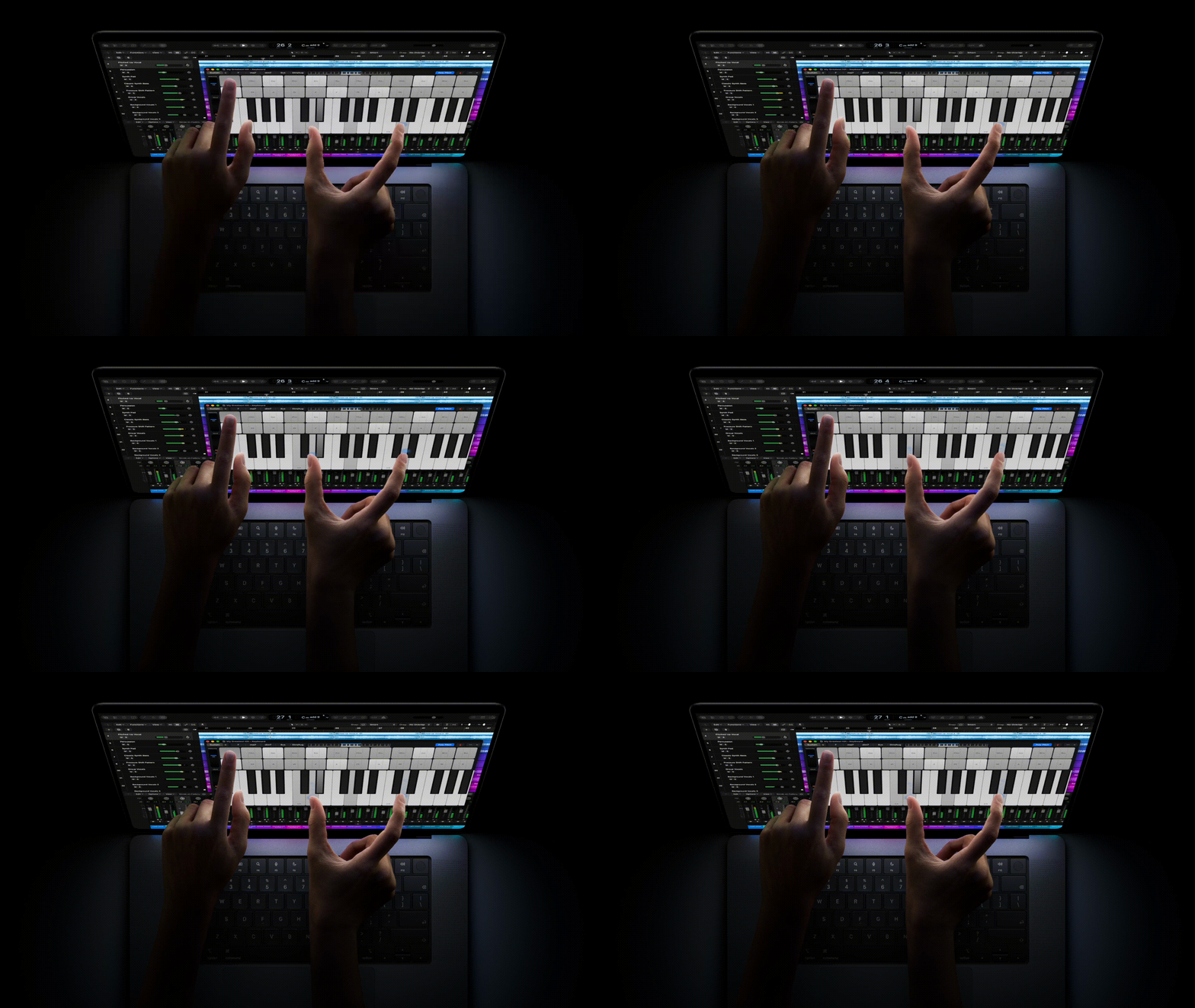
I have seldom wanted to touch my MacBook’s screen. I’ve repeatedly done so accidentally, because after almost twenty years of using an iPhone, it’s become instinctual to reach out and tap to dismiss a dialog or to swipe a page. I curse myself every time I do it, but in those moments, I would have appreciated having a touchscreen.
Is a touchscreen reason enough for me to buy this (or any) MacBook? Lord, no. Not even close.
Am I hoping that touchscreens will eventually come to every MacBook in the lineup as a standard feature, the way a built-in camera is, for those brief interactions? I confess, I am.
I don’t think I’d enjoy using it in the way Apple demonstrates, though, as seen in the above images. Both look extremely awkward. When used on your lap, or otherwise not planted on a flat surface, the MacBook must be grasped or balanced, somewhat precariously, with one hand so you can touch it with the other. Even when firmly situated on a desk, reaching out to interact with the screen forces you to contort your hands into unnatural positions.
Were I in the market for a high-end MacBook Pro—which I most definitely am not!—the MacBook Pro with PROLED XDR Display (ugh) would make a compelling purchase, even without a touchscreen. I currently see touchscreens on a Mac as a nice-to-have, but not a necessity.
Check in with me in a year or two.
Apple today announced the new 14-inch MacBook Pro with M6, delivering even more performance, powerful on-device AI capabilities, and faster connectivity for college students, business users, creators, and more. M6 features an advanced 12-core CPU with the world’s fastest CPU core, so everything from productivity tasks to more demanding pro workflows feels incredibly fast and responsive. The 12-core GPU delivers up to 30 percent faster graphics and up to 25 percent faster AI workloads when compared to M5, making the 14-inch MacBook Pro with M6 a compelling value for users who need serious power. For those upgrading from M1, the performance gains are even more significant, with up to 11x faster graphics and up to 13x faster AI performance. With additional Neural Accelerators in the GPU and a Dual 16-core Neural Engine, M6 turns MacBook Pro into an even more powerful platform for AI — from taking advantage of Siri AI and Apple Intelligence features across apps and macOS to running LLMs locally, all while preserving user privacy. In addition, the 14-inch MacBook Pro features Wi-Fi 7 and Bluetooth 6, while superfast storage makes working with large files, exporting projects, and running demanding AI workflows fly. And with phenomenal battery life of up to 24 hours, it delivers the same remarkable performance whether plugged in or on battery, so users can work, create, and pursue their passions from anywhere.
The entry-level 14-inch MacBook Pro is the laptop people buy when they think they need “Pro” in their laptop’s name. For most of those people, a well-specced MacBook Air would suit them just fine. Unless, of course, they need ProMotion and a Liquid Retina XDR display, or HDMI out and an SD card slot (without carrying around a pocket full of dongles), in which case they’re already plonking down the $2,000–$4,049 needed to buy one.
Preorders for the 14-inch MacBook Pro with M6 open October 28. Availability starts November 6.
This is a perfectly serviceable spec bump, but the real star of the show comes tomorrow.
Apple today announced the new iMac featuring the superfast M6, delivering even more performance and powerful AI capabilities in its strikingly thin all-in-one design. From families and aspiring creators to small businesses, users will experience the speed and power of M6 in everything they do. Featuring a faster CPU and GPU with Neural Accelerators in each core, it blazes through everyday apps and multitasking while delivering powerful performance for creative workflows like photo and video editing. For Intel-based upgraders, the leap is even greater, with up to 18x faster performance than the most popular Intel-based iMac.
I love that Apple is comparing the performance of the iMac M6 to an Intel-based iMac. I’m guessing most people still using an iMac have one with Intel inside.
I’ll be honest. I haven’t thought about iMac in years. My last one was the 2017 27-inch iMac Pro 5K, which, admittedly, was one of my favorite computers. I’ve long since moved on to the desktop-laptop lifestyle, with a 14-inch MacBook Pro connected to an Apple Studio Display as my main “working” computer (and a 13-inch MacBook Air as my everyday and travel system). Most people I know also prefer laptops for their flexibility and portability.
If you’re a desktop aficionado, this M6 iMac looks great. Everything about it blazes: Wi-Fi 7, Bluetooth 6, optional 2.5 Gigabit Ethernet, 2x faster SSD, Thunderbolt 4.
Pricing starts at $1,500 for the model with two Thunderbolt ports, 10-core CPU and GPU, 16GB memory, and 256GB storage. It rises as high as $3,300 for the model with four Thunderbolt ports, 12-core CPU and GPU, 32GB memory, and 2TB storage, plus a new nano-texture glass option.
Preorders for iMac M6 open October 28. Availability starts November 6.
CNN (Lisa Eadicicco, Clare Duffy, and John Towfighi):
Anthropic filed for an initial public offering Monday in what could become one of the largest stock market debuts in history — detailing its surging business growth, along with a vast multitude of warnings about how it could all go wrong.
Anthropic’s filing with the Securities and Exchange Commission sets the stage for the company to go public and begin trading on the stock market as soon as November 16. The IPO could reportedly value the company at up to $2 trillion, which would make it one of the largest public companies in the world.
The Washington Post (Gerrit De Vynck and Miriam Waldvogel):
Anthropic, maker of the Claude chatbot, lost $80 billion in the first half of 2026 as it poured its investment funding into training new AI models and securing access to data centers to run its chatbot and the coding agents it sells to businesses. The start-up’s revenue also grew at a staggering pace, from $1.16 billion in the first half of 2025 to $16.3 billion in the first half of 2026, the company said in a Monday filing — a 14-fold increase.
The New York Times (Mike Isaac, Erin Griffith, Lauren Hirsch, and Sri Muppidi):
In a financial prospectus for what could be the largest ever initial public offering, the San Francisco company revealed that sales of its A.I. products like the Claude chatbot to other businesses had grown at an astonishing clip. But it also said that it was losing money and planned to spend at an even faster rate as it invests heavily in A.I. infrastructure to support that growth.
[…] Stunningly, the company has committed up to $807 billion in contracts for data centers, chips and computing power, many of which cannot be canceled, over the next 10 years, according to a tally by The New York Times. Many of the contracts span different lengths of time, and the terms have yet to be finalized for some.
AP News (Barbara Ortutay and Bernard Condon):
Reflecting AI’s dangers, the document includes some unusual provisions, including granting [CEO Dario Amodei and president Daniela Amodei] and their five other co-founders 50.1% of shareholder votes through a special class of shares. Anthropic has also appointed independent, financially disinterested members of a so-called Long-Term Benefit Trust, holding power to appoint directors, that is designed to ensure the company doesn’t put financial interests ahead of public safety.
Another unusual feature of the filing is its long list of “risk factors,” a required disclosure for every public company but in this case one that runs nearly 100 pages — and makes for riveting reading.
Among the risks are the quotidian — the possibility it won’t be able to retain key staff or navigate regulatory roadblocks — and the horrific. The latter includes the prospect of “malicious actors” using AI models to build chemical weapons, authoritarian rulers turning to the technology to crack down on their citizens and, given the numerous hacking incidents from rogue AI agents recently, the possibility Anthropic’s AI models could “pose catastrophic or existential risks to humanity.”
The company will trade on Nasdaq under the symbol ANT, which, I learned recently, is also what employees call themselves.
The larger 8.5-inch OLED display, also available with a nano-texture option, delivers higher contrast and more than 2x higher peak brightness than the previous-generation iPad mini for a brilliant and immersive viewing experience. A20 Pro supercharges AI with Neural Accelerators in each GPU core and Dual 16-core Neural Engine. iPad mini now has a 12MP Center Stage front camera on the landscape edge that’s perfect for video calls, an innovative Acoustic Display for an even better audio experience, faster wireless and cellular connectivity, and fast-charge support. With its incredible set of advanced features, it’s the most capable and versatile iPad mini ever.
My two-year-old iPad mini is my most-used iPad. My two wishes have been for a faster chip and a thinner and lighter chassis. Apple has fulfilled both: 0.21 inches/5.4 mm thick (down from 0.25 inches/6.3 mm) and 0.56 pound/255 grams (down from 0.66 pound/293 grams), and it’s ever so slightly narrower at 5.22 inches/132.6 mm (down from 5.3 inches/134.8 mm). See Apple’s comparison chart.
The tradeoff is a significant leap in price: the new iPad mini starts at $700 versus $500 two years ago (and I bought mine at a discount). That entry price gets you 128GB of storage and a 5-core CPU. 256GB of storage is $800, while 512GB is $999 (which also bumps you up to a 6-core CPU).
Also new this year is a nano-texture glass option for an additional $100, but only on the 256GB and 512GB models—so really, a minimum $200 premium if all you wanted was nano-texture.
(I added a $50 Paperlike screen protector to my iPad mini, which offers some of the benefits of nano-texture glass. I also swapped my default Apple Pencil tips for $20 Paperlike Pencil Tips, which improves the writing feel substantially.)
Gone this year are any color choices beyond “dark” (Midnight, replacing Space Gray) and “light” (Starlight). So long, Blue and Purple.
I’m tempted by the OLED display and thinner and lighter frame, further sweetened by Apple’s trade-in offer of up to $340 on an iPad mini. I’ll wait until I get my hands on one to decide.
Preorders for iPad mini open on October 28 (at the unusual time of 10:10 am Pacific Time), and it will be available starting November 6.
According to a Thursday Bloomberg report, new Federal Election Commission filings show that [Elon] Musk contributed another $77 million to his America PAC in the first half of October, bringing his total political giving this election cycle past the $445 million mark.
Wilkens describes the $445 million as an “eye-popping figure,” which it is, both as a concrete sum of money and as a political contribution. It’s worth considering the amount in the context of Musk’s vast wealth, however. Musk’s estimated net worth was $1.011 trillion on October 21, 2026, the day before Bloomberg’s report (it’s down to $922 billion as of this writing). $445 million is a staggering amount of money to most of us, but represents approximately 0.05% of Musk’s net worth. It’s the equivalent of a millionaire donating $500, or the typical American family (median net worth: $216,000) donating $108.
In other words, to Elon Musk, spending $445 million to buy himself political insurance is effectively an accounting error.
I didn’t expect to enjoy this interview with Nathan Fielder (paywalled; Apple News+), conducted by Katie Drummond for Wired ahead of the release of You Can See Everything, Fielder’s hotly anticipated film about Elizabeth Holmes. I’ve never seen any of Fielder’s work (and what little I’ve read didn’t suggest I’d find it appealing), so my interest in the film was mostly academic (Is Holmes truly the batshit psychopath the viral trailer makes her out to be? Is the film as extraordinary as the reviews insist?). The interview left me intrigued by Fielder and fascinated by his process. I’m especially curious to see how his experiences during filming play out on screen. I’ll wait until it’s on streaming, though.
Mark Zuckerberg is barrelling toward a future in which an autonomous network of AI agents will run our lives — shopping for us, working for us, talking to other people’s AI agents for us. Are humans ready for this very specific and unrelenting vision of a life in which we communicate primarily through bot proxies? Actually, don’t answer that. The more urgent question coming off Meta’s quarterly earnings call Wednesday night is more likely to be: “Is he?”
Zuckerberg is staking Meta’s future on Muse, the personal AI agent it released to the general public last month. It’s early days, but Zuckerberg told investors during Wednesday’s call that he sees a future where “billions” of people are using Muse, and those people’s Muses are talking to and transacting with other people’s Muses in a “large-scale Muse network.”
If history is a guide, Zuckerberg will soon rename the company to “Muse,” spend billions of dollars chasing an illusion, then abandon it in favor of the next shiny.
To date, the app has been downloaded and set up by more than 10 million users in the US and Canada, making it one of Meta’s “most successful launches ever,” according to Zuckerberg. He did not share specific retention numbers but said that a quarter of people who downloaded Muse initially are using it daily.
That’s ten million users unwittingly exposing their private data to Meta, 2.5 million of them on a daily basis.
[Zuckerberg] sees the biggest opportunity in commerce: A quarter of Muse users are shopping through the platform, Zuckerberg said, and are spending, on average, more than $200 per purchase.
How much of that $200 per purchase was authorized?
Meta earns a fee for every commercial transaction that takes place on Muse. Zuckerberg’s thinking seems to be that if AI agents are doing the shopping, the potential number of transactions that could take place on the platform is, essentially, unlimited.
Zuckerberg complains when Apple inserts itself into every App Store transaction, yet has no issues siphoning money for himself. The hypocrisy is staggering.
He’s going to need the money:
The company’s capex is through the roof, and other financial obligations are piling up. It plans to spend between $135 billion and $145 billion in 2026, double what it spent last year.
Meta burned $80 billion pursuing the metaverse, with nothing to show for it. Muse feels like a redux. Coming soon to an earnings report near you: Metaverse 2: Electric Boogaloo.
Stevie Bonifield, The Verge (and countless social media posts):
If you’ve been feeling nostalgic for your old iPod, you can head over to Apple Music’s 404 page to listen to music on a virtual re-creation of the first-generation iPod. The hidden iPod was spotted by users on social media on Friday. It’s appropriately stocked with music from the early 2000s, like Coldplay’s “Viva La Vida” or Gorillaz’s “Feel Good Inc.” The iPod seems to pop up on any non-existent Apple Music page, so you can find it by just adding a string of random letters after the main Apple Music URL.
Any non-existent URL works. I used https://music.apple.com/jason because why not?
You’ll need to enter the URL in a web browser, as clicking the link opens up the Apple Music app.
It’s a surprisingly faithful recreation of the iPod interface, right down to the “haptic” clicks as you twirl the center wheel.
(At one point, I spun and randomly clicked a song and was immediately transported.)
Perhaps not coincidentally, I seem to own (or “own”) about half of the music available on the virtual iPod. The early 2000s very much felt like a musically monocultural moment, with all of us downloading the same songs. The recreation captures that zeitgeist rather well.
Jason Snell, with a brief reminiscence about the release of the iPod, 25 years ago today:
[…] I was struck by just how quickly the iPod’s importance was overshadowed by the iPhone. There are barely more than five years between the launch of the iPod and the launch of the iPhone. While both products took time to grow into their markets, I think it’s still the case that the true “iPod era” was only a handful of years long, and it’s been entirely overshadowed by the product that came after it.
That’s a shame, in a way, because I think people who didn’t live through this era don’t understand just what a hit the iPod was. It completely changed Apple’s fortunes, rehabbed its brand identity, gave people reasons to go into Apple’s relatively new retail stores for the first time, and taught Apple lessons that it needed to learn before it could build a smartphone.
Snell and Myke Hurley cohost Designed in California, “Expertly-told stories about the 50-year history of Apple and the world it created.” The current series is about the origin of the iPod and is worth a listen if you’re at all interested in its history.
(Snell also wrote “25 things to know about the product that changed Apple (and the world)” for Tom’s Guide.)
The iPod was the first completely new product Apple announced after I joined the company in April 2001. I remember all of the rumors, but the announcement came as a complete surprise. (It was my first—but by no means my last!—example of what “Need to Know” meant at Apple.)
I recall taking a road trip with my good friend Elliot to see the San Francisco Giants play the Los Angeles Dodgers[1], about a month before the iPod announcement. Elliot is a techie and early adopter (like me), and he already sported a hard drive-based music player in his VW Bug. Cruising down the highway, we blasted music and debated whether an Apple music player could possibly compete in a market that was already well established. What could Apple possibly add except to make it prettier and more expensive? Both were true, of course, but little did we know how important—and iconic—iPod would become.
We watched from the nosebleed upper deck at Chavez Ravine as Barry Bonds hit his 67th home run in the top of the seventh inning, a solo dinger that gave the Giants a 2–1 lead (and eventual win), en route to his record-setting 73-home-run season. ↩︎
I’m pretty sure I still have my original iPod somewhere. The last I saw it, the chrome back had been scratched to hell. It remained absolutely beautiful.
Charlotte Gunn at Wallpaper shares details about Apple Music’s new visual and sonic identity, which recently launched alongside a brief making-of video:
Apple Music has enlisted British producer Fred Again.. to help turn sound into something tangible for its new visual identity. Built around the idea of being ‘made by sound’, the redesign takes an experimental approach, using musical frequencies to create rippling, liquid forms. The results were achieved by playing music into a shallow bath of mineral oil and filming the resulting vibrations.
Fred Again.. and his collaborator Nest Acoustics developed a short musical composition that doubles as the brand’s new sonic signature. Individual notes were played through a transducer, a device that converts audio signals into physical vibrations, causing the oil to ripple in response. The movements and refractions were captured on camera, providing the raw material for the new design.
The Apple Music typography also saw an update:
A new wordmark pairs the recognisable Apple symbol with a customised version of Apple’s own typeface, SF Pro. Bold, lowercase lettering gives the service a youthful energy, while a reworked musical note icon takes its shape from the forms captured during filming.
The new visual appearance is very much Liquid Glass-inspired, with echoes of the redesigned Apple TV logo (Apple’s first foray into a physically crafted logo). It’s organic and dynamic and just beautiful.
As I’ve said before, Apple is really leaning into the handcrafted aesthetic, and I am loving it. Which Apple Services logo gets this treatment next? The obvious candidate is Apple Books. It’s just crying out for it—translucent sheets of paper flipping open as colorful lights shine through them? I mean, duh. Apple, call me.
Ayo Omolewa, aka @ayoships, posted this viral video to Instagram that explains how Block Blast, a free-to-play, ad-supported game, uses various shady in-game tricks to force players to lose so the game can show ads, to the tune of an estimated $127 million in the first half of 2026:
It turns out how well you do in the game has less to do with your skill and more to do with how much you’re worth to them in ads.
Omolewa reverse engineered and decompiled the game using AI tools and found it gathers a lot of data about you as a player and uses that data to make the game easier or harder, even forcing unwinnable sequences, so it can display more—and more profitable—ads when it determines you’re most likely to watch one—like when you’ve just lost after beating your high score and it offers a “revive” option if you watch an ad. (Omolewa wrote a detailed technical explanation of his findings. I encourage you to read it even if you’re not technically minded. It is very readable and includes a couple of neat interactive examples.)
Two thoughts:
One, I find these in-game tricks to be decidedly unsavory. Block Blast isn’t the only app engaging in such underhanded behavior, of course: it’s rampant in the ad-supported mobile games industry, and is perhaps even worse in games with in-app purchases, which are even more incentivized to get you to make a purchase. Once you’re identified as someone willing to watch ads or make purchases to ease or extend your gameplay, the more likely such opportunities will be presented. I find the entire thing distasteful, and that’s before we get into the psychological tricks these games often employ to keep you playing.
Two, this is a great use of LLMs. It’s faster and more efficient than manual decompiling, and the result is an exposé of sorts of the various dirty tricks game developers use to bilk you out of your time or money. It’s a tremendous educational tool on both dimensions.
These tools also threaten to upend and eventually displace developers across the game—heck, the app—industry. LLMs make it astoundingly easy for unscrupulous developers to rip off entire apps with just a few prompts. Some developers have become reluctant to #BuildInPublic or share beta versions of their apps out of fear that they will be quickly cloned and released before the originals are even made available. One developer used AI to clone a dozen apps that mimic Adobe Creative Suite and Microsoft Office apps, and subsequently declared “software is over.”
It’s fashionable these days to be either an irrationally exuberant supporter or an intractably alarmist detractor of LLMs. I prefer a more modulated position from which I can appreciate their benefits even as I acknowledge the harms. Whether you think LLMs are good or bad, you’re right. To repurpose Hamlet’s philosophy, “There is nothing either good or bad, but thinking makes it so.”
Emily Guskin, reporting for ABC News on the results of a recent ABC News/Washington Post/Ipsos poll:
Seven in 10 Americans are not confident that Trump will accept the results of the upcoming midterm elections if the Republican Party loses, including half who are “not at all” confident.
Just 28% of Americans say they are “very” (10%) or “somewhat” (18%) confident that Trump will accept the results of midterms if Republicans lose.
94% of Democrats and 77% of independents have little confidence that the sitting president of the United States will accept the results of the midterm election if his party loses. Even 36% of Republicans don’t think he will.
Those three in ten Americans who believe Donald Trump would accept a losing outcome are truly trusting souls. Monty Python’s Black Knight would sooner accept defeat.
Andrew R. Chow at Time magazine writes a mostly flattering portrait of John Ternus (“Apple’s New Era”—“How CEO John Ternus Is Engineering the Future”) for its “Best Inventions of 2026” issue. Worth reading, though nothing especially earth-shattering is revealed here. I did, however, enjoy this minor jibe:
In person, Ternus presents as a guy trying to blend in: he dresses in nondescript clothes and speaks in platitudes, often about the brilliance of Apple’s internal culture.
Many of Ternus’ quotes do read like they’re straight out of What Makes Apple, Apple. He is, by all appearances, a true believer.
Apple Developer News on Friday:
As outlined in our App Review Guidelines, pornographic material has long been prohibited on the App Store — this includes apps that generate nudity or sexually explicit imagery, such as “nudification” apps that create sexually explicit images of real individuals without their consent. Apps that host user-generated content are required to filter objectionable material, give users a way to report offensive content, and let users block abusive accounts. Apps containing hidden or undocumented features are also prohibited on the App Store, including apps that misrepresent their purpose during review and only reveal harmful capabilities — such as “nudification” — after approval, a tactic commonly known as bait-and-switch.
And:
We’re committed to keeping bad actors off the App Store, with established processes in place to review and act on apps that violate our guidelines. Last year, we prevented over 150K apps with safety issues from reaching customers and terminated over 193K developer accounts for engaging in fraud and abuse. These violations trace back to malicious actors — in some cases coordinated fraud operations — working to conceal harmful content that only becomes active once an app is approved, and as their tactics evolve, we continue to evolve our own tools and resources to prevent and catch this kind of behavior even faster. We do not hesitate to remove apps, and terminate the developers behind them, when they violate these guidelines.
The three changes to the Guidelines are clear and unobjectionable. I fully support Apple’s push to remove from the App Store any apps (and developers) found to be in violation. But there’s a vast gulf between saying they’ll remove apps and actually removing apps. As proof of their sincerity, I recommend they start with Grok, the most prominent app that generates nonconsensual nudes, but I don’t have any faith that John Ternus will go against Elon Musk, considering the extent to which Ternus and other Apple executives have continued to embrace Musk’s X.
Sample lyric in “I Got the High Ground,” from YouTube channel “ai am a jedi”:
My aura is purple, your aura is broke / The dark side is for lame motha funkers / Bro, you a joke
Yes, the video is heavily AI generated. It’s also an exceptionally well-done parody, a spot-on pastiche of R&B videos from the ’90s and 2000s, right down to the rap break. (I believe all of the music is created and performed by humans.) I laughed my ass off watching this and the other videos on the channel. (From “Do You Slap It?”: “What ain’t no planet I ever heard of. Do they slap the bass in What? Bass motherfucker, do you slap it?”) There are good uses and bad uses of AI. This is a good use.
(Via Faisal Jawdat.)
Jon Passantino, writing for Status (email-gated) regarding Friday’s Tesla Roadster reveal:
“Elon Musk shows ‘flying cars’ are real,’” CBS News reported. “Elon Musk unveils Tesla’s new Roadster, and it can fly,” ABC News heralded. “Tesla Has Built a Flying Car. It Will Blow Your Mind,” Barron’s proclaimed.
While these are real headlines, Musk’s latest creation is not really a flying car. Instead, it’s a one-seat electric vehicle with a massive compressed-gas tank consuming the backseat and passenger chair to provide mere seconds of lift in the air. And while Tesla says the Roadster will enter production in 2028, other basic details, including when any of the supposed flying cars will be delivered was not announced. In fact, Tesla says the vehicle, which is not street legal, will be sold only by invitation, so you won’t actually be able to buy one.
To top it all off, Tesla might not deliver the cars ever. That’s right, while Tesla is seeking as much as $250,000 to reserve a version of the car that never leaves the ground, the website’s fine print includes a disclaimer that the vehicle might not be delivered at all.
The subhed to Passantino’s piece:
Musk’s “flying” Roadster can stay airborne for only a few seconds, but that was apparently long enough for much of the press to abandon its skepticism entirely.
The press is either exceptionally gullible or believes their readers are. They’re ably assisted by the contingent of Tesla/Musk stans breathlessly heralding Musk as a genius and proclaiming the arrival of “flying cars.”
No. What Tesla and Musk showed off was a Hollywood-style special effect. An impressive-looking and practical effect, but no less staged. The Roadster wasn’t flying, it was falling with style.
(By the way, I’m completely unsurprised by the bizarre fantasy videos that Tesla chuds are churning out and cheering on. And yes, that last one is in fact Senator Ted Cruz supporting vehicular assault on a group of bikers.)
As for Musk, he’s hardly a genius. He’s the “leader” who finds a parade and gets in front of it, then asserts he’s the founder. He declares audacious goals he has little ability to reach then claims success at the smallest achievement. He’s the quintessential snake oil salesman who intensely understands the energizing and distracting value of a flashy demo.
He imagines himself as Steve Jobs, a visionary defining the future, but is in reality a modern-day Harold Hill, a con man selling thrusters instead of trombones.
Shawn McCreesh, Tyler Pager, and Hamed Aleaziz, reporting for The New York Times (gift link):
President Trump’s new press secretary, Katie Zacharia, was forced out of her role Friday after five days on the job, a rare reversal by the White House that capped a week of upheaval.
That’s just half a Scaramucci. We now have a new unit to measure time-to-termination and time-based incompetence: a Zacharia. Our thanks to Anthony Scaramucci for his service.
Usage:
Note that Zacharia is both singular and plural: one Zacharia; three Zacharia.
The use of Scaramucci is now considered obsolete and should be replaced by an appropriate number of Zacharia. Instead of a Scaramucci, use two Zacharia.
(Exception: when referring to Anthony Scaramucci’s time in his role as White House communications director, that remains a Scaramucci.)
If you have any questions, please contact your editor.
Withings, which makes products for tracking your health, announced recently that as of October 13, new customers must buy a $100-a-year Withings+ subscription to enable syncing their health data to Apple Health and other third-party apps, a feature that was previously free.
“Matteo A” writes in the Withings support forums:
I reached out to Customer Support and their response was completely contradictory. They claimed that syncing with Apple Health is a “standard feature that does not require a subscription,” but in the very next sentence, they confirmed that “any account created after October 13th will be asked to sign up for a Withings+ subscription in order to export data” justifying it with new “privacy measures” and an “AI connector”.
Let’s be clear: writing data to Apple Health via HealthKit happens locally on the phone. It does not require complex cloud compute, server costs, or any “AI connector”. It’s a basic API call.
Matteo A calls this “unacceptable,” and as a Withings customer (we have a Body Cardio scale and BPM Connect cuff, but no subscription), I wholeheartedly agree, despite being unaffected by this change. Matteo A is also right that syncing to Apple Health is a basic API call. Charging for that is likewise unacceptable.
Hold that thought.
“Markus From Withings” responded:
We’ve been closely following the active discussions regarding the recent updates, and we’d like to offer some clarity and reassurance about what is changing and who is affected.
1.) If you already have a Withings account, nothing changes. If you created your account on or before October 12, 2026, automatic third-party sync stays free. This is tied to your account, not your device, so buying a new scale, watch or any other Withings device in the future won’t affect it. Your sync stays free.
2.) Every user, member or not, can export their full history as CSV or PDF at any time, keep importing data from other apps, and share data with their doctor through HealthLink and PDF reports. None of this is behind a paywall.
What’s changing for new members: for accounts created from October 13, 2026, automatic sync to third-party apps is part of Withings+.
That’s neither “clarity” nor “reassurance”—it’s garbled confirmation designed to confuse.
Withings blames the policy change on its use of “AI,” adding a disclaimer to the top of its “Partners - Exporting From Withings to Partner Apps” support page:
The activation of our Withings AI connector has required changes to our API and new privacy measures.
The “Withings AI Connector FAQ” explains further:
We’re rolling out our Withings AI Connector MCP (Model Context Protocol) which is an open-source way for customers to interact with our Health Assistant. This significant upgrade has necessitated a few changes to how accounts access their data when transferring it to and from partners, and for us to make certain changes to our privacy policy.
In other words, “we secretly replaced the perfectly fine and free sync feature with rich, dark, sparkling AI, and now we can’t afford our token usage bill.”
Enshittification comes for everyone, and AI makes enshittification faster.
Apple may have something to say about it, though. Going back to Matteo A’s “basic API call,” Apple’s App Review Guidelines prohibit monetizing built-in capabilities:
4.10 Monetizing Built-In Capabilities
You may not monetize built-in capabilities provided by the hardware or operating system, such as Push Notifications, the camera, or the gyroscope; or Apple services and technologies, such as Apple Music access, iCloud storage, or Screen Time APIs.
Apple Health is part of iOS, and HealthKit is documented right alongside the Screen Time APIs Apple calls out.
Apple would be perfectly justified in rejecting the Withings app for gating Apple Health syncing behind a subscription.
Not that they will. YouTube, for example, has gated background video playback behind a subscription for years despite it being easily enabled. I’ve never understood Apple’s enforcement of this guideline; as some developers have discovered, it can be arbitrary, and the “solution” seems to be to bundle more features alongside the built-in capabilities. Charge for background video? Rejected. Charge for background video and no ads? Approved. Totally logical.
(Via Joe Rossignol at MacRumors. See Also, Hacker News)
In the previously linked Washington Post article revealing the list of donors and the vast sums they gave to Trump’s vanity ballroom, is this paragraph:
Absent from the list is Trump himself, who has said that he is helping to pay for the project. “It’s being paid for a hundred percent by me and some friends of mine,” he said last year, days after demolition began on the old East Wing.
I generally remove the cruft—often trackers—from URLs I share as a matter of course, so it amused me that the original link for the word “said” contained this at the end of it: ?utm_source=chatgpt.com

ChatGPT adds that tracker to any URL it shares during a chat session. Clicking the link tells the website where the traffic came from.
(It’s similar to the ?ref=jagsworkshop.com appended to the end of links on this site.)
At best, it means someone at The Washington Post used ChatGPT to find that link, then copied and pasted it into the article without remembering (or knowing) to remove the tracker. I can imagine a prompt like “find me a transcript of Donald Trump saying his ballroom would be paid for by him and his friends.”
At worst, it suggests someone at WaPo used ChatGPT to write that paragraph. I fervently hope that’s not the case.
Jonathan O’Connell, Sarah Blaskey, and Aaron Schaffer, writing for The Washington Post (gift link but email-gated; Apple News+):
A list obtained by The Washington Post reveals all the major donors to President Donald Trump’s White House ballroom project, including previously undisclosed contributors who have benefited from regulatory decisions, government contracts and, in one case, a pardon for a family member.
Tech giants Nvidia and Apple each committed $25 million, the top contribution amount, the list shows. The Adelson family, one of the GOP’s largest donor dynasties, committed that sum as well, as did billionaire Charles Ergen, co-founder and chairman of telecommunications company Dish Network.
Absent from the list is Trump himself, who has said that he is helping to pay for the project. “It’s being paid for a hundred percent by me and some friends of mine,” he said last year, days after demolition began on the old East Wing.
The White House publicly identified 37 people, companies and foundations as donors last October, without revealing the amount of their individual gifts.
The list obtained by The Post, an internal spreadsheet used to track contributions for the fundraising effort, contains the source, date and amount of all 67 donations above $10,000 recorded as of late last month. It shows a total of $333 million from private donors, aligning with the administration’s public statements. Additional records, also internal to the fundraising effort, provide more detail about the donations and indicate that at least $77 million came from donors who requested anonymity.
We’ve known since last October that Apple, Amazon, Google, et al. donated to Trump’s ballroom. What’s new is the additional 30 or so previously unknown donors and the scale of those donations.
I can’t fathom the reasoning behind such largess from Apple, Nvidia, Google ($22 million via its previous settlement with Trump), and the rest. Is there a single, legitimate reason for these companies to donate anything to Trump’s ballroom, let alone such vast sums? Are they that patriotic? Are they somehow exuberant about a grotesque, oversized monstrosity going up in their name? The whole mess screams of corruption, one giant quid pro quo.
Every presidential candidate must commit to tearing down Trump’s physical legacy and relegating him to a forgotten footnote in history.
Apple’s new HomeView in Rose Pink, Silver, and Space Grey is currently $290 on Amazon; Starlight remains $300.
AppleCare for HomeView is also $10 less than from Apple: $49 for two years of coverage versus $25 a year.
No word on delivery dates from Amazon, though. My local San Francisco Apple Stores show Space Gray and Rose Pink as available on release day, November 13, while Silver and Starlight have slipped to November 16. (The color mix seems to vary by store.) Will Amazon shipments also arrive on Friday or get delayed to Monday, or even later?
I preferred Silver, and briefly considered Starlight, but instead placed a preorder for Space Gray at Apple, foregoing the $10 Amazon savings to ensure first-day pickup at my local Apple Store. Besides, Space Gray will contrast nicely with my all-white countertops.
Apple Newsroom, Tuesday:
Apple today announced Apple Home Collection, a new lineup of smart home accessories — including indoor and outdoor cameras, thermostats, temperature sensors, and a video doorbell and door lock — designed in collaboration with LG Electronics and Schneider Electric. These new accessories are simple to set up starting with one tap with iPhone, and everything is managed through the Apple Home app — no separate app or account required. Each accessory is encrypted end-to-end in Apple Home, so only users and the people they choose can access their home data.
Apple Home Collection looks pretty much like what you’d expect Apple-designed smart home products to look like, just… not from Apple. The products “feature a clean, minimal aesthetic and premium materials, with every detail considered, from how they mount and adjust to how they look and feel alongside Apple products throughout the home,” which sounds exactly like what Apple would write if it had slapped its own logo on the products instead of “collaborating” with LG and Schneider.
I’ve been building a smart home ecosystem for several years, so I’m not tempted by most of the Collection. We’re currently all-in on Eufy cameras, our Ecobee thermostat works great, and we love our Aqara U400 front door lock (unlocking as we approach is game-changing). The compact and unobtrusive design of the LG door lock is quite appealing, and I do like the “privacy tilt” feature of the LG Indoor Cam, though. (More indoor cameras should have privacy features.) I’m mostly tempted by the LG doorbell. I’ve been wanting to replace our ancient analog doorbell with an electronic version with a camera, and this looks to be a solid entry. (I’d been eying the UniFi doorbell and smart chime, but that isn’t HomeKit compatible without a lot of effort.)
If you haven’t already committed to a smart home ecosystem and want an easy onramp, Apple Home Collection looks like a solid starting point. (Everyone should at least have a smart lock on their front door.)
You can preorder items in the Collection today and buy them starting in December—but only (initially?) in the U.S. and Canada, with some products also available in the UK. No word on when—or if—these will be available in the rest of the world.
I rarely link to Marques Brownlee’s videos because 21.4 million subscribers, but his general HomeView skepticism closely mirrors my own, though he lands firmly in the “skip” camp and I’m more yolo about it. I know a few people who would like nothing more than an adorable iPad-on-a-swivel in their living room, always available to play music or the latest podcast, check their schedules or the weather, and ask “How many Jedi survived after Order 66?” as they watch Maul – Shadow Lord. An iPad mini on a $10 or $20 swivel would be more useful, but also costlier, and decidedly less cute.
Apple today introduced Apple HomeView, designed to be central to the home and personal to everyone in it. With a stunning 7-inch Liquid Retina display, HomeView brings entertainment, connection, and smart home management together in one place, from playing music and making FaceTime calls to home monitoring and hands-free automations with voice control — all designed with privacy and security at the core. HomeView recognizes users by their faces, adapting so they can access their personal content in Messages, FaceTime, Calendar, Reminders, and Find My. HomeView features Siri AI, an entirely new version of Siri that’s profoundly more capable and conversational, with broad world knowledge that powers richer music discovery and onscreen awareness. When paired with an Apple Intelligence-enabled device, it can also draw on a user’s personal context, such as their Calendar, Messages, and relevant information across their apps, to provide more helpful, personalized responses.
I kid, of course. HomeView is not just an iPad mini on a swivel.
It’s also wall-mountable.
You’ll forgive my joshing here. My initial reaction upon watching the oddly chaotic three-minute intro video was but why? Why wasn’t this an iPad, mini or otherwise? Those are more portable and therefore more useful in more places.
(Okay… okay, yeah, I hear it. “Less portable, more purchases.”)
My initial reaction was immediately replaced with I must have this! It’s cute and fun and, at $300, right on the edge of why not?
I have no need for one. I don’t often use an iPad in my kitchen. I’m not generally checking my calendar or taking FaceTime calls from there, and the HomePod minis currently deployed in every room handle my ambient Siri needs. (Though not Siri AI, which HomeView supports, and indeed, seems designed around.)
And yet.
The design is reminiscent of the Apple iMac G4, known variously as the “sunflower” or “lamp” computer, and endearingly anthropomorphized in one of Apple’s most adorable ads. I have two of them. They’re beautiful objects.
(I hope Apple eventually pays homage to that ad. Alas, there’s no “tongue” for HomeView to stick out.)
The lack of a battery means HomeView is limited in where it can go. Having a power cable running across your kitchen counter is also not terribly appealing. A charging base would have been an interesting option: HomeView could mostly sit in one place, but could be moved to a more convenient location as needed.
(It’s powered by a removable USB-C cable, so it can be unplugged and moved. If it boots instantaneously, that could be a reasonable alternative, but it means, for example, ending a FaceTime call if you want to continue it in the living room.)
The most compelling feature was multiuser support. Up to six faces can be recognized by the Center Stage camera to unlock personal content. Because HomeView doesn’t have Face ID, it instead uses device proximity, as John Gruber learned:
But in order for users to be recognized — by voice or face — they must have a “registered personal device” that supports Apple Intelligence and Siri AI, that device must be present on the home’s Wi-Fi network, and it must have been recently unlocked. […]
Effectively, your iPhone or iPad serves as a second factor to securely identify you.
I can only hope that Apple is now motivated to bring multiuser functionality to iPad and iPhone.
HomeView is $299 for the swivel model in one of four colors (Silver, Starlight, Rose Pink, and Space Gray) and $299 plus the cost of a mounting base for the wall-mountable model (which comes in only Silver and Space Gray). Mounting options include USB-C ($60), AC wired ($80), and Power over Ethernet ($130). PoE is not yet available for purchase.
(Yes, I also find it odd that the wall-mounted version, which lacks the base, swivel, and down-firing woofer, is the more expensive option.)
Preorders are open now, and HomeView is available November 13.
Unless you’re in the European Union, that is:
Apple HomeView is not available for sale in the European Union, as Siri AI is currently unavailable in iOS in the EU. Apple is working constructively with the EU in an attempt to find a path forward.
That must sting.
Elevation Lab, writing on their company blog:
We launched an AirTag silencing tool recently. We have always made products we want for ourselves, and this was no different - we wanted it for AirTags on our bikes. (Some of us here have bikes more valuable than our cars.)
Unfortunately, “products we want for ourselves” and “bikes more valuable than our cars” are perhaps more telling of the Elevation Lab culture than I think they meant it to be.
Why would someone want a silent tracking device hidden on expensive gear? They understand why AirTags make noise: to identify them audibly when an item is out of sight, and to alert someone when an unknown AirTag is near them.
If you lose track of an item attached to an AirTag, Apple’s Find My network gets you in the vicinity. The chirps guide you to the item.
If a thief steals your bike, the “unknown AirTag” alert chirps and informs them the bike is being tracked.
Unstated but implied by the Elevation Lab team is they don’t want to alert a thief to the presence of an AirTag, lest it’s found and discarded, rendering their expensive bikes and other gear untraceable.
That may be the case, but were I a thief, the chirp of an AirTag emanating from some recently pilfered kit would cause me to abandon it immediately rather than waste time finding and disabling that AirTag. In addition to making items easy to find when stolen, AirTags can also act as a deterrent to them being stolen in the first place.
That suggests these folks were more interested in silently tracking their stolen bikes rather than preventing their bikes from being stolen in the first place. Why? Were they hoping to engage in a bit of vigilante justice?
Even if they weren’t and planned to call the police to direct them to the stolen goods, nothing is more convincing that the gear is yours than triggering an alarm from your iPhone.
In retrospect though, this also has the side effect of aiding someone with bad intentions to track someone that wouldn’t get phone notifications.
The backlash must have been tremendous. That, or a lawyer made a phone call to point out the obvious liability of having “someone with bad intentions” use their product to stalk, harass, or harm someone.
We have removed the product
Good.
and will use our patent on it to prevent anyone else from making one in the future.
What an odd detail to include. A patent means the silencing method is described in explicit detail—practically an instruction manual for how to create the product. A cynical and uncharitable person might suggest they mean for others to follow those instructions themselves.
Sincerely, Elevation Lab
I hope Elevation Lab takes a lesson here: always seek feedback from outside your own bubble.
When people talk about throwing the cocktail party of their dreams, this is what I imagine they mean.
On a summer evening in 1972, a pivotal generation of Harlem Renaissance artists and intellectuals gathered at Duke Ellington’s townhouse. For over three hours, this extraordinary group - many of whom had not seen each other in fifty years - reminisced, critiqued, argued, laughed, and drank while wrestling with their place in a rapidly shifting cultural landscape.
Filmed “by legendary filmmaker William Greaves and completed fifty years later by his son David,” this may represent the greatest collection of Black excellence ever captured on film. Eubie Blake’s comment, “Being here with all these intelligentsias, I’m afraid to open my mouth,” reflects exactly how I’d feel.
Read more about the film and William Greaves (an artist I was, sadly, unfamiliar with until now).
This is a film we’d excitedly build an event around when I was co-chair for Black@Apple—historic, illuminating, joyous. I hope someone at Apple is already making the necessary phone calls. (And please invite me if it happens!)
Reviews: New York Amsterdam News, Variety, The Hollywood Reporter, The Guardian, Rotten Tomatoes (100%), Metacritic (93/100).
Sheets.works publishes wonderful interactive visual essays (“Data Drops”) every week, and I always forget to visit (and link to) them. This week, my socials and feeds were awash with links to one of its recent essays, The people holding up the internet:
We downloaded the full history of 23 pieces of software that phones, browsers and servers depend on, and counted everyone who made ten or more changes to each one between October 2025 and October 2026. Then we listed what is actually installed on an Android phone, an iPhone and a Windows PC.
11 of 23 projects had one or two people doing the regular work.
If you’ve been on the internet for any reasonable amount of time, you’ve probably seen the “All modern digital infrastructure” XKCD comic. This essay is the proof.
One example of the “random person” who is “thanklessly maintaining” critical internet infrastructure is Todd Miller. Miller made “5,408 of 5,409 changes to sudo between 2008 and 2018.” sudo is “the command that gives you admin rights on a Mac or a Linux server” (and the subject of another well-known XKCD comic). It has about 30 current sponsors on GitHub and an “estimated annual budget” of just under $62,000 on Open Collective. That is a mere pittance for a project that is used by virtually every sysadmin and Unixy system in the world to gate access to sensitive files and destructive commands, yet is “the best funded one-person project in our count,” notes Sheets.works.
I find it both exceedingly heartwarming and immensely unsettling that huge swaths of our digital infrastructure are maintained by a random collection of volunteers who make effectively zero money from their work and whose main incentive is to write code they’re proud to share with the world.
The lack of financial support for these critical projects stands in stark contrast to the billions of dollars they (directly or indirectly) help generate. Meanwhile, the new Omarchy Linux “distribution”—effectively the personal Linux configuration of white nationalist David Heinemeier Hansson (“DHH”)—accumulated nearly $27 million in pledges in the span of a few months.
Merit, longevity, and foundational importance to the internet are clearly not the overarching criteria for securing funding for open source projects.
The public will be able to watch the execution of a former US Army major by firing squad, US Defence Secretary Pete Hegseth has said.
A Defence Department official told the BBC the execution of Nidal Hasan, who fatally shot 13 unarmed US soldiers at the Fort Hood military base in 2009, would be livestreamed.
It is believed it would be the first public execution in the US in almost a century.
Truly barbaric. Trump approves of livestreaming the execution. J.D. Vance says he wouldn’t watch. When J.D. Vance is your voice of sanity, it’s time to reexamine your life.
I’m shocked Hegseth and Trump aren’t monetizing the execution on pay-per-view. Yet, I suppose.
Donald Trump, spouting off on “Truth” Social on Thursday (archived on Trump’s Truth to avoid searing your eyeballs):
The White House considers anyone that uses the term, ‘Artificial Intelligence,’ as opposed to the highly accepted new and more accurate term, ‘Super Intelligence,’ THE ENEMY! President DONALD J. TRUMP
That’s the sitting president of the United States, focusing his precious and unwavering attention on the biggest issue of the day, in a way only a very stable genius can.
A few days earlier, Trump toady Elon Musk had already declared in a tweet that he plans to rename his company from SpaceXAI to SpaceXSI—which, coincidentally, I’m sure, can be abbreviated to SXSI. I expect he’ll change the stock ticker any day now.
In the days following Trump’s initial demand to rename “AI” to “SI,” Slovenia has seen a run on its top-level domain. Anguilla must be fuming.

And it gets more ridiculous. Adi Robertson in The Verge:
Justice Department press releases have been modified to include the phrase, trumpeting that a man who flooded streaming platforms with AI-generated songs between 2017 and 2024 committed “Super Intelligence-Assisted Music Streaming Fraud.”
I like to imagine that the prosecutor tasked with making this linguistic fable happen executes massive air quotes each time.
Greg “Joz” Joswiak announces the event on X/Twitter with a video of a hand-embroidered invitation. Hello Apple on Instagram has an extended version. It’s quite lovely.
(Apple has really leaned into the handcrafted aesthetic recently, starting, I feel, after the backlash to its “Crush” ad. See, for example, A Critter Carol, the Apple TV logo, or the Mac Neo ad. More, please.)
The event is expected to “focus on new smart home products, including the long-rumored smart home hub, a new Apple TV 4K, and a refreshed HomePod mini,” according to MacRumors.
In my post about Margaret Hamilton, I wrote:
Hamilton insisted on calling the still-nascent field “software engineering” to describe the exacting development process she and her team were pioneering to ensure the safety of those astronauts.
That’s accurate as far as it goes, but woefully incomplete. Hamilton offered a far more extensive explanation in an interview published in an out-of-print textbook; Wikipedia quotes a portion of that interview, but Dave DeGraw tracked down the full interview. In it, Hamilton provides much-needed context behind her desire to call her field “software engineering.” Here’s the section that leads into the Wikipedia quote:
Requirements engineers and software engineers necessarily became interchangeable, as did their life-cycle phases— suggesting that a system is a system, no matter from which discipline things had originated. From this perspective, system design issues became one and the same as software engineering design issues. Yet, the systems-software part of the flight software was in a world all of its own!
“What is the difference,” I asked, “between what they are doing and what we are doing?” Knowing this, and the lack of understanding by many of what it took to create real world software-based systems and the part our software played within these systems, I wanted to give our software “legitimacy” so that it (and those building it) would be given its due respect; and, as a result I began to call what we were doing “software engineering” to distinguish it from other kinds of engineering; yet, treat each type of engineering as part of the overall systems engineering process.
The whole interview is fascinating.
(Via MJ Tsai.)
Margaret Hamilton, a profoundly influential computer scientist best known for leading the software engineering team at MIT’s Instrumentation Lab during NASA’s Apollo program, died on Sep. 30. She was 90.
A computing pioneer who authored over 130 publications, Hamilton helped to establish software engineering as a dedicated discipline. She worked at MIT from 1959 until the mid-1970s, after which she became a successful computing entrepreneur and CEO.
Trip Gabriel’s obituary in The New York Times credits Hamilton as the person “who led the 100-person team that wrote the onboard software for the Apollo missions, guiding Neil Armstrong and Buzz Aldrin to a safe landing on the moon.”
Hamilton insisted on calling the still-nascent field “software engineering” to describe the exacting development process she and her team were pioneering to ensure the safety of those astronauts.
Later in life, Hamilton became an icon for women in science and technology, especially after a now-famous photo, showing her next to a printout of her MIT team’s Apollo code, began circulating online.
The New York Times tops its obituary with the 1969 photo of “the 5-foot-4 Ms. Hamilton standing beside a head-high stack of printed code developed for the moon landing.”
Just a few days ago, someone posted that photo on Mastodon. I saw only the bottom few pixels as I scrolled, but immediately recognized it. It’s that iconic.

Apple’s AirPods Pro 3, which Apple sells for $249, is available at Amazon for $179. (That’s an affiliate link.) That’s a pretty good deal, but if you have Costco and DoorDash memberships, you can do better.
Costco is selling AirPods Pro 3 for $199, and includes two years of AppleCare ($40 from Apple). Some DoorDash members are seeing a Costco price of $213, but DoorDash is emailing some of its members a 20-percent-off-$100+ code for Costco purchases: “COSTCO20” (up to $50). Finally, Costco is selling $100 DoorDash gift cards for $80.
These can be stacked:
Your final amount will be higher once you take taxes, DoorDash fees, and Dasher tip into account. For example, here’s what it would cost me in each scenario:
Summarized:
| Buy From | Spend | Save |
|---|---|---|
| Apple (plus AppleCare) | $314 | — |
| Amazon (plus AppleCare) | $236 | $78 |
| Costco (includes AppleCare) | $220 | $94 |
| Costco via DoorDash (includes AppleCare) | $167 | $147 |
With the right memberships and credit cards, you can stack additional savings. For example, Costco’s Goldstar Executive Membership gives 2% cash back. Chase credit cards provide a $10 monthly DoorDash credit. And so on.
Costco notes “Price valid through 10/18/26”; I would presume the DoorDash price also expires then (if not sooner). The gift cards have been available consistently but could go away, too. And by the time you read this, the Amazon deal will likely have already expired. If you’re in the market for AirPods Pro 3 and have Costco and DoorDash memberships, this could be the deal of the year.
Perhaps just in time for AirPods Pro 4 to come out.
(My thanks to my wife Ying for alerting me to this stacking deal.)
⚙︎